welcome to

Website-Bastelstunde I

with jakob :3

slides: http://jakob.ruckel.de/slides/www-i/

1/17 • website-bastelstunde i • jakob béla ruckel • 20 apr '26

Why?

  • It’s fun!
  • It’s cooler than (a lot of) social media
    • You can do anything
    • You have full control
2/17 • website-bastelstunde i • jakob béla ruckel • 20 apr '26

What not?

  • Professionalism
  • Slop
3/17 • website-bastelstunde i • jakob béla ruckel • 20 apr '26

What?

  • Today:
    • HTML + CSS 101 (no javascript :p)
    • Hosting basics
  • Next time:
    • Static site generation
    • Hosting with CI
4/17 • website-bastelstunde i • jakob béla ruckel • 20 apr '26

Hello, Web!

<!DOCTYPE html>
<html>
    <head>
        <title>My site</title>
    </head>
    <body>
        <h1>Hello!</h1>
        <p>this is so cool!</p>
        <img src="https://http.cat/200"/>
    </body>
</html>

My site

Hello!

this is so cool!

5/17 • website-bastelstunde i • jakob béla ruckel • 20 apr '26

<h1>HTML Things</h1>

<h2>Heading 2</h2>

<h3>Heading 3</h3>

<p> Paragraph with <b>bold</b>, <i>italic</i>, and <u>underlined</u> text </p>

<ul>

  • <li>list item</li>
  • <li>list item</li>

</ul>

6/17 • website-bastelstunde i • jakob béla ruckel • 20 apr '26

More HTML Things

  • Links: <a href="https://example.com">Link</a>
  • Images: <img src="https://http.cat/200"/>
  • Line break: <br>
  • and many more…
7/17 • website-bastelstunde i • jakob béla ruckel • 20 apr '26

More, More HTML Things

  • <div> is a container
<div style="padding: 1em; background-color: lightblue">
    <div style="padding: 1em; background-color: pink">
        <div style="padding: 1em; background-color: white">
            <marquee>hello!</marquee>
        </div>
    </div>
</div>


hello!
8/17 • website-bastelstunde i • jakob béla ruckel • 20 apr '26

Style

p { background-color: red; }
  • p is the selector, selecting all <p> elements, and
  • background-color is a property…
  • …which is set to the value red
9/17 • website-bastelstunde i • jakob béla ruckel • 20 apr '26

Selectors

  • we can give elements classes and ids:
<p class="my-cool-class">hi</p>
<p id="my-cool-id">hi</p>
  • in CSS, we select things like this:
p { background-color: red; }
.my-cool-class { background-color: green; }
#my-cool-id { background-color: blue; }
10/17 • website-bastelstunde i • jakob béla ruckel • 20 apr '26

More Selector Stuff

  1. combinators
    • span.rainbow selects <span> with the rainbow class
    • p img selects all <img> that are (somewhere) inside a <p>
      • p > img only selects ones that are direct children
  2. pseudo-classes
    • a:hover selects all #foo that the user is hovering over
      • #link-pseudo-classes:hover {background-color: black; color: white}
  3. pseudo-elements
    • #bar:hover::before { content: "i am a link to " }
  4. attribute selectors

this is some crazy stuff, all w/o javascript!

11/17 • website-bastelstunde i • jakob béla ruckel • 20 apr '26

More Important things

  • You can set font-size, width, height, padding, margin, …
    • common units:
      • 1 em = size of the font
      • 1px = 1 pixel
      • 1 vh (1 vw) = height (width) of the viewport
      • 0 (nothing)
      • % (relative to parent)
12/17 • website-bastelstunde i • jakob béla ruckel • 20 apr '26

Developing

you’ll need:

  1. a text editor (vim, vs code, notepad, butterflies, …)
  2. a web browser
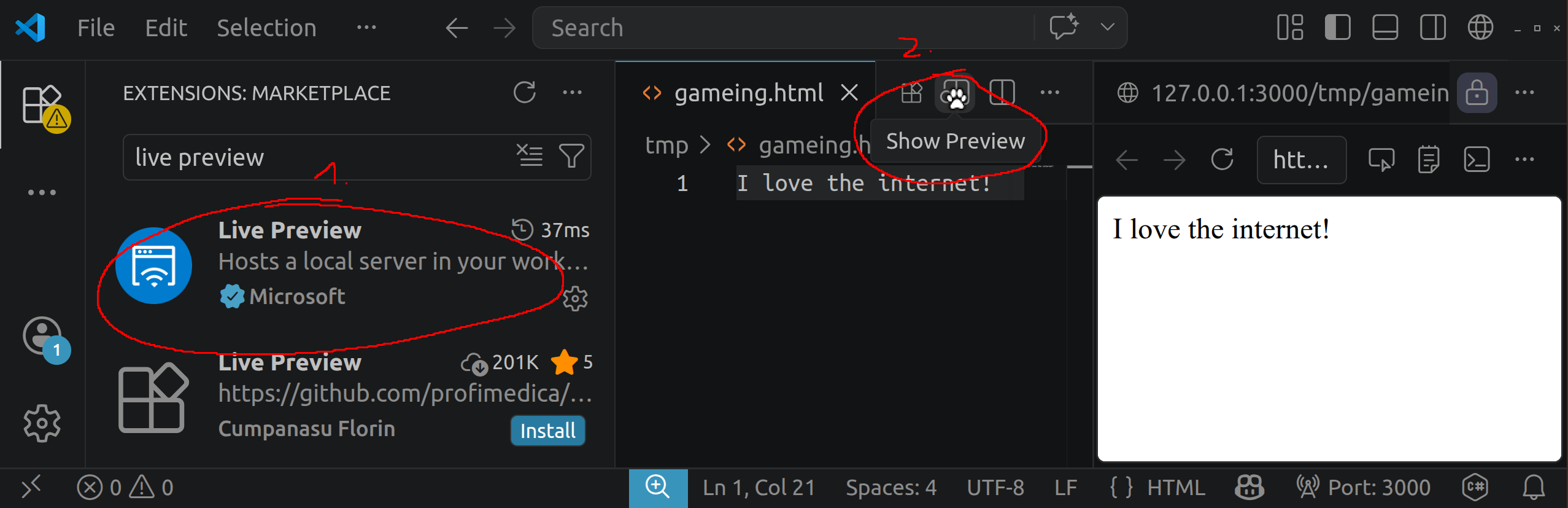
  3. nice-to-have: live reloading
    • via some server, e.g.:
      • install: npm i -g live-server, run: live-server
    • vs code has an extension for that:
13/17 • website-bastelstunde i • jakob béla ruckel • 20 apr '26

Hosting

Options:

14/17 • website-bastelstunde i • jakob béla ruckel • 20 apr '26

Uni Hosting

  • uni username: abcd1234
  • note: this is ancient stuff, btw!
    • unix, 70s: ~ became synonymous with home
    • ~abcd1234/ = /home/abcd1234/
    • people had home directories on the webserver
    • stuff goes in ~abcd1234/public_html/

Apache 1.3 Documentation, 2001

15/17 • website-bastelstunde i • jakob béla ruckel • 20 apr '26

Uni Hosting – How?

  1. grab some ftp client, e.g. FileZilla
  2. connect to uni vpn
  3. connect the ftp client:
    • host: webuser.uni-weimar.de
    • username: abcd1234
    • password: *******
  4. upload your html!

there’s also some more detailed documentation from SCC

16/17 • website-bastelstunde i • jakob béla ruckel • 20 apr '26
17/17 • website-bastelstunde i • jakob béla ruckel • 20 apr '26